Agents, off your desktop
Your agents get desktops of their own. Yours stays untouched.
omabox gives every AI agent a whole Omarchy desktop, invisible and in parallel, to launch, click, type and screenshot apps in. However much it does, it never takes control of your system.
- No windows popping up out of nowhere
- Your cursor never moves
- No focus stolen mid-sentence
- No password or keyring prompts
- No notifications or tray icons left behind
- No workspace switches
git clone https://github.com/diogochaves/omabox && cd omabox && ./install.shOmarchy 4 · Hyprland 0.56+ · a GPU render node · MIT
What it fixes
An agent testing a desktop app tests it on your desktop.
Ask an agent to check a GUI change and it runs the app where you are working. Windows land on top of your editor, your keystrokes go into its app, your workspace switches, your cursor jumps, a password prompt waits for you. Here is the same agent, twice.
The promise
The agent never takes control of your system.
Everything an agent does to see and test its work happens in its box. Here is what that keeps off your desktop, and how.
Its own screen
A box runs its own compositor on a private screen. Nothing it opens is drawn on yours.
Its own pointer and keyboard
Clicks and keys go to the box's own virtual devices, never through uinput, so your cursor and keyboard are never touched.
Nothing opens on your session
No focus changes, no workspace switches. When you peek, the window opens on workspace 9 without taking focus.
No system bus, a throwaway keyring
In a box, pkexec fails at once instead of asking for your password. Its keyring stores and reads secrets without prompting; yours is never asked.
Its own bar
Notifications and tray icons land in the box's bar, and go when the box goes.
The guard, if you want it
With omabox guard on, agents' shells get a display that doesn't exist, so a stray window fails instead of appearing.
In the box
- The repo you started it from, read-only, at the same path
- Your theme, bar layout and terminal settings
- mise's toolchains, so node, python and uv work as on the host
- Its own screen, session bus and throwaway keyring
Off until you ask
- Network isolation:
--net isolated --allow 8081 - A systemd user manager:
--systemd - X11 apps:
--xwayland - Your real desktop, one command at a time:
omabox host
A box keeps an agent's apps off your desktop and out of your config, and never gets your secrets or input devices. It is not a security boundary: it shares your kernel, GPU and, by default, your network. To fence the agent in, pair it with ai-jail.
Parallel boxes
One box per agent, the way you give each one a worktree.
A worktree keeps agents' code apart. A box keeps their screens, session buses and test runs apart. Each agent session gets its own box, named after its worktree and its session, so visual checks and desktop tests run side by side without ever seeing each other.
Separate screens
Each box runs its own Hyprland on a private screen of any size. One agent's window never covers another's screenshot.
Separate session buses
Tray icons, notifications, D-Bus names and the keyring are per box, so one agent's test never sees another's, or yours.
Separate lifetimes
One agent's omabox down never ends another's box. A throwaway omabox run -- ctest gets a box of its own, too.
Agents
Agents use it on their own.
Install once. Your agents reach for a box whenever a task touches the desktop, without you asking and without changing your projects.
A skill they already load
install.sh puts the omabox skill wherever Omarchy puts its own. Agents load it for GUI apps, screenshots, shell plugins and tests that touch the desktop.
The guard, for when advice isn't enough
Opt in with omabox guard on: agents' shells lose your display, so a window they forget to box fails with an error the skill explains. When you ask for your real desktop, the agent uses omabox host -- CMD, on the record.
Your projects stay as they are
| Your project says | The agent runs |
|---|---|
./build/app | omabox run -d -- ./build/app |
grim out.png | omabox shot -o out.png |
hyprctl -j clients | omabox hyprctl -j clients |
ctest --test-dir build | omabox run -- ctest --test-dir build |
omarchy-theme-set gruvbox | omabox run -- omarchy-theme-set gruvbox |
Commands
The agent drives its box the way you drive yours.
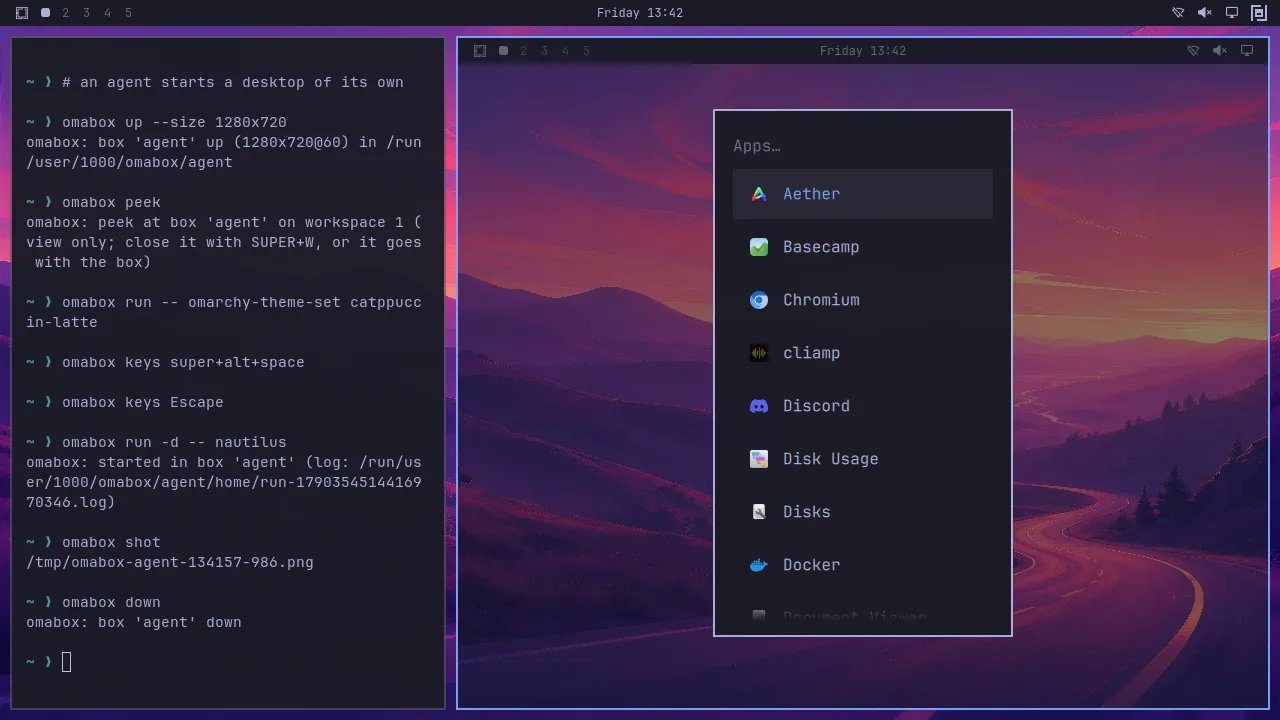
Launch, type, click, wait and look, with commands that report what happened. Here are the ones agents reach for most, then the rest.
Peek shows where the agent clicks and what it types, over the view only, never in its screenshots.
Start a box, end it
omabox up starts one in 3–4 s: 1920×1080 by default, any size and refresh rate, or your monitor's with --size host. omabox down ends it, and a session's box goes when its agent exits.
$ omabox up --size 2560x1440@144
$ omabox down
Run anything inside
run -d launches an app in the box. With no box up, run starts a throwaway one for the command, your repo mounted as a discarded overlay, and takes it down after.
$ omabox run -d -- ./build/app
$ omabox run -- ctest --test-dir build
Look
shot saves a PNG of the screen, a region, or one window's own pixels, even covered or on another workspace. --fit 1280 sends the model fewer pixels.
$ omabox shot --window foot --fit 1280Type and click
keys sends combos and types any Unicode text; --pass VAR types a password from your shell, never on a command line. click --in SHOT X Y maps a pixel of a scaled shot back to the screen.
$ omabox keys -t 'hello wörld' ReturnWait, don't sleep
wait returns when the screen holds still, a window shows up or goes, or a command passes. keys, click and run -d take --wait, and say so when nothing changed.
$ omabox wait window foot --focused
satisfied: window foot focused after 0.17s
Windows as targets
windows lists the box's windows, where they are and what covers them. --window picks one by class, title, pid or address for shot, click and keys, and never guesses.
$ omabox click --window foot 320 160And the rest
hyprctlthe box's Hyprland, never yourspointerraw moves, scrolls and dragspeeka live, view-only window of a boxmodea box's screen size and refresh rategpuGPU time of a box's processesrestart-shellreload the bar after a plugin editenvpoint host-side Wayland tools at a boxpatha box's directory and HOMElsevery box, its size, network and idle timeconfigwhere windows open, close confirm, bar iconguardkeep agents' shells off your displayhostone command on your real desktop, when askedA box can also take your plugins (--plugin), an isolated network (--net isolated --allow 8081), a systemd user manager (--systemd), X11 apps (--xwayland), or be a window you drive (--interactive). omabox help has every flag.
Watch
Look inside any box, or take the wheel.
Peek
omabox peek opens a live, view-only window of any box on workspace 9, without taking your focus. It only copies frames out, so the agent never notices.
Interactive
omabox up --interactive makes a box a real window you drive with your own keyboard and mouse. SUPER+ALT+ESC sends SUPER keys into it.
The bar widget
The omabox mark in your Omarchy bar lists every box, with peek, screenshot and down for each. The copy here works: click a box, or focus the panel and use its keys.
Your desktop. The boxes are elsewhere, invisible, until you peek.
A working copy of the widget's panel. The boxes are made up; the screenshots are real.
Better together
ai-jail fences the agent in. omabox keeps its windows out.
ai-jail, by Fabio Akita (AkitaOnRails), is the sandbox we point people to. It runs an agent inside bubblewrap, Landlock and seccomp on Linux (and Windows through WSL2), and sandbox-exec on macOS. It does carefully the one thing omabox doesn't do: limit what the agent can read, write and reach. The two answer different questions, so they stack.
- your project, at its real path
- ~/.ssh, ~/.aws, ~/.gnupg
- your shell's tokens
- network, unless you allow it
the box's
No window, no focus change, no prompt.
ai-jail answers: what can it touch?
A fence around the agent
- Your project read-write at its real path,
/usrread-only - A fresh home: no
~/.ssh,~/.aws,~/.gnupgor browser profiles - The environment cut to an allowlist, so tokens stay in your shell
- Network, display, GPU and Docker off until you allow them
omabox answers: where does it draw?
A desktop of its own
- Its own screen, pointer and keyboard
- Its own session bus, tray, notifications and keyring
- Your cursor, focus and workspaces untouched
- Not a security boundary: that part is ai-jail's
Try a build you don't trust yet
A contributor's branch, an app you just downloaded: run it in ai-jail, and give it the box's screen as its only display.
ai-jail keeps it out of your home, keys and network; its window opens in the box, where omabox shot and
peek see it.
$ omabox up
$ eval "$(omabox env)"   # Wayland clients now draw in the box
$ ai-jail --gpu --rw-map "$WAYLAND_DISPLAY" --env WAYLAND_DISPLAY -- ./build/app
Tested with ai-jail 2.2.0 and omabox 0.2.0 on Linux.
Not yet: an agent inside ai-jail driving omabox itself. The jail has its own process namespace, so the
omabox command inside it can't see the box. For now, keep the agent under omabox's guard and put the apps it
runs under ai-jail. It's planned in issue #16, with no change
needed in ai-jail.
Compare
Is omabox what you need?
It does one thing: keep agents off your desktop while they test on a desktop of their own. If you want something else, these projects are good at it.
Your agents build and test GUI apps, plugins or themes on Omarchy, several at once
omabox
Parallel, invisible Omarchy desktops, up in 3–4 s for about 500 MB each, and your own untouched. Omarchy on Linux only, and not a security boundary.
You want an agent on your own desktop, beside you, or cloud machines for agents at scale
Cua
Cua's fleets run computer-use agents on cloud Linux, Windows, macOS and Android machines for training and evals. Its Driver works on your own macOS, Windows or Linux desktop, through a CLI, MCP or SDKs, and can click and type without taking your cursor or focus where the app allows it (on Hyprland, still experimental and a few apps). omabox does the opposite: it keeps agents off your desktop.
You want to limit what the agent itself can read, write and reach
ai-jail
A jail for the agent process, on Linux, macOS and Windows through WSL2: your home, SSH keys and cloud credentials out of reach, the project writable. omabox isn't a sandbox; ai-jail is one, and the two stack.
You need a whole machine: the real installer, system services, a reboot
omarchy-in-omarchy
A disposable Omarchy in QEMU/KVM, 8 GB of RAM by default. Heavier: it installs itself once, in about 30 minutes, then boots in about 18 seconds. A real machine, where a box has no system bus.
Written in September 2026 from each project's own site. They move on their own, so check theirs.
Install
Three minutes, then your agents take it from there.
What you need
- Omarchy 4 on Arch, with Hyprland 0.56+
- A GPU render node. Tested on AMD and Intel iGPUs and NVIDIA RTX 4070 SUPER and 5070 Ti cards.
- A patched aquamarine until a release ships PR #415.
install.shbuilds it privately; your system's copy isn't touched.
Install
$ git clone https://github.com/diogochaves/omabox && cd omabox
$ ./install.sh           # asks before turning the guard on
$ ./install.sh --check   # starts a box, screenshots it, takes it down
$ omarchy plugin enable chaves.omabox   # the bar widget
Update with git pull && ./install.sh. To remove it, see the README.
Questions people ask first
Does it work without Omarchy?
No. A box runs your host's own Omarchy: its Hyprland config, its shell and your theme. That is what makes it faithful, and why it needs Omarchy 4 and Hyprland 0.56 or later.
Is omabox part of Omarchy?
No. omabox is an independent community project, built by the people below, and is not made or endorsed by the Omarchy project. It is built for Omarchy and follows its conventions, so report problems on omabox's GitHub, not to Omarchy.
Can two agents test at the same time?
Yes. Each Claude Code or Codex session gets its own box, named after its repo or worktree and its session. Anything else started with omabox guard exec gets one too.
Is it a sandbox?
No. It keeps apps off your desktop and never gets your secrets, input devices or seat, but it shares your kernel, GPU and, unless you pass --net isolated, your network. For a fence around the agent, use ai-jail, which pairs well with omabox; for hostile code, a VM.
Does it work on NVIDIA?
Yes. It was tested on an RTX 4070 SUPER with driver 615.71.09, and on an RTX 5070 Ti beside an AMD iGPU. An interactive box renders on the GPU your desktop renders on; with several GPUs, point a headless box at one with OMABOX_RENDER_NODE.
Does peeking slow the agent down?
No. Peek only copies frames out of the box.
Built by
Everyone who has shipped code to omabox.
 btsouth
 diogochaves
Your machine is the test we don't have
omabox has run on a handful of setups. Another GPU, several monitors, a fresh Omarchy or a config nothing like ours:
run ./install.sh --check and tell us what happened. That helps as much as code. Bug reports, fixes, tests,
docs and ideas are all welcome, and your tile goes up here with your first merged change.