How it works
A whole desktop for every agent, none of it on yours.
A box is a real Omarchy desktop: its own Hyprland, your theme and bar, on a screen only it can see. Here is what that keeps off your desktop, what a box gets, how agents use it, and how you look inside one.
What it keeps off your desktop, and how
Everything an agent does to see and test its work happens in its box.
Its own screen
A box runs its own compositor on a private screen. Nothing it opens is drawn on yours.
Its own pointer and keyboard
Clicks and keys go to the box's own virtual devices, never through uinput, so your cursor and keyboard are never touched.
Nothing opens on your session
No focus changes, no workspace switches. When you peek, the window opens on workspace 9 without taking focus.
No system bus, a throwaway keyring
In a box, pkexec fails at once instead of asking for your password. Its keyring stores and reads secrets without prompting; yours is never asked.
Its own bar
Notifications and tray icons land in the box's bar, and go when the box goes.
The guard, if you want it
With omabox guard on, agents' shells get a display that doesn't exist, so a stray window fails instead of appearing.
What a box gets
Enough of your setup to look and behave like your desktop, and nothing that would let it reach yours.
In the box
- The repo you started it from, read-only, at the same path
- Your theme, bar layout and terminal settings
- mise's toolchains, so node, python and uv work as on the host
- Its own screen, session bus and throwaway keyring
Off until you ask
- Network isolation:
--net isolated --allow 8081 - A systemd user manager:
--systemd - X11 apps:
--xwayland - Your real desktop, one command at a time:
omabox host
A box keeps an agent's apps off your desktop and out of your config, and never gets your secrets or input devices. It is not a security boundary: it shares your kernel, GPU and, by default, your network. To fence the agent in, pair it with ai-jail.
Agents use it on their own
Install once. Your agents reach for a box whenever a task touches the desktop, without you asking and without changing your projects.
A skill they already load
omabox setup (install.sh runs it) puts the omabox skill wherever Omarchy puts its own. Agents load it for GUI apps, screenshots, shell plugins and tests that touch the desktop.
The guard, for when advice isn't enough
Opt in with omabox guard on: agents' shells lose your display, so a window they forget to box fails with an error the skill explains. When you ask for your real desktop, the agent uses omabox host -- CMD, on the record.
Sign in once, every box starts signed in
An app that needs an account, a PIN or a library: set it up in a box once and omabox save it. Boxes started --from the save open with it already set up, keyring included.
$ omabox save signed-in
$ omabox up --from signed-in
One box per agent session
A worktree keeps agents' code apart. A box keeps their screens, session buses and test runs apart. Each
session's box is named after its repo or worktree and the session, like app-tray-5cc72cdc.
Separate screens
Each box runs its own Hyprland on a private screen of any size. One agent's window never covers another's screenshot.
Separate session buses
Tray icons, notifications, D-Bus names and the keyring are per box, so one agent's test never sees another's, or yours.
Separate lifetimes
One agent's omabox down never ends another's box. A throwaway omabox run -- ctest gets a box of its own, too.
Each box: about 500 MB, up in about 4 s, down when its agent exits or after 2 h idle.
Look inside any box, or take the wheel
A box is invisible until you want to see it.
Peek
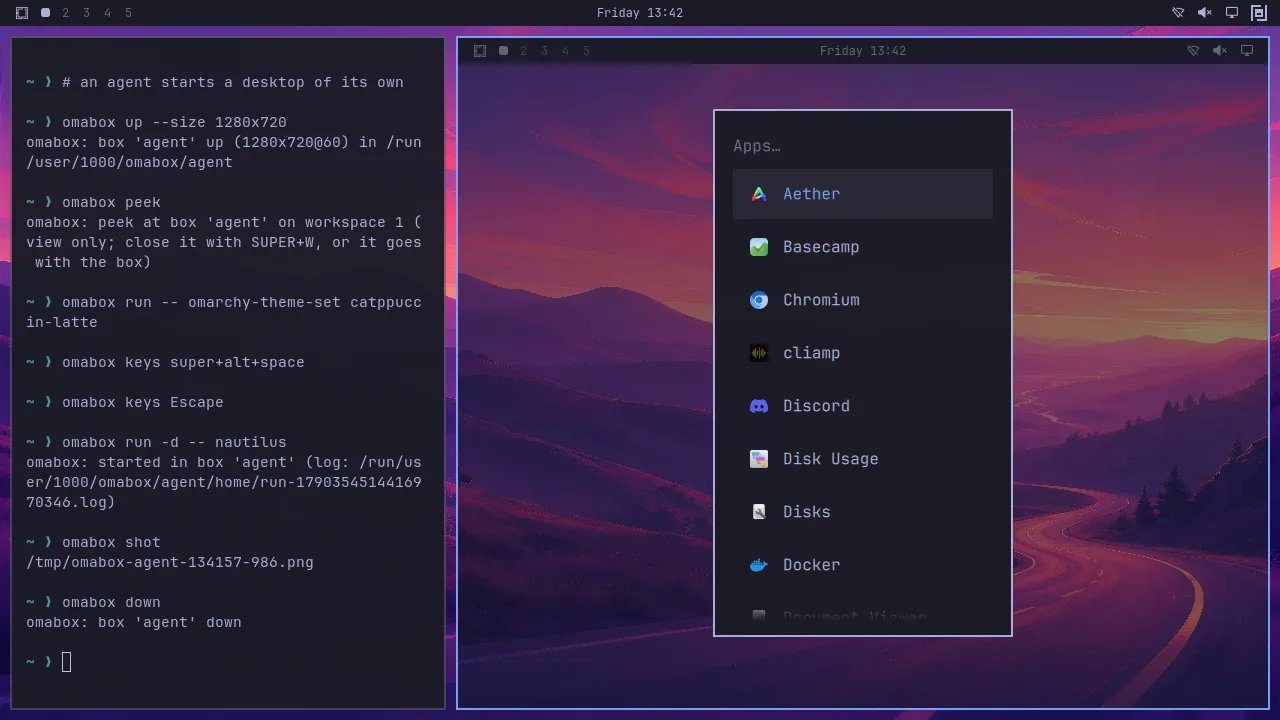
omabox peek opens a live, view-only window of any box on workspace 9, without taking your focus. It only copies frames out, so the agent never notices.
Interactive
omabox up --interactive makes a box a real window you drive with your own keyboard and mouse. SUPER+ALT+ESC sends SUPER keys into it once; with omabox keys-to-box on they follow focus and the pointer into it, and its border turns red while they do. omabox clip hands it your clipboard (a URL, a password), and --from-box brings the box's back.
The bar widget
The omabox mark in your Omarchy bar lists every box, with peek, screenshot and down for each, and keys-to-box and the clipboard in and out for an interactive one. The copy here works: click a box, or focus the panel and use its keys.
Your desktop. The boxes are elsewhere, invisible, until you peek.
A working copy of the panel in omabox 0.4.6. The boxes are made up; the screenshots are real.
Keep reading
Each part, on its own page.
Install
Give every agent a desktop of its own.
Omarchy 4 with Hyprland 0.56 or later, and a GPU. Three minutes, then your agents take it from there.
$ git clone https://github.com/diogochaves/omabox && cd omabox && ./install.sh