Desktops
Any Hyprland. Fullest on Omarchy.
A box is one of three desktops. omabox picks the first one that fits your machine; you can ask for any. Whichever it is, the box is invisible, its own, and gone with the agent.
An Omarchy box
Omarchy's own desktop
Omarchy's Hyprland config and shell (bar, menu, tray, notifications), with your theme, bar layout and terminal settings.
Runs on Omarchy 4.5. The default there.
$ omabox up
A plain box
Hyprland, nothing more
Hyprland on a small config of omabox's: its defaults, your keyboard layout, a terminal on SUPER + RETURN. Your shell as its bar, if you want one.
Runs on Arch, Fedora 45, Debian sid, openSUSE Tumbleweed. On Omarchy too, for an app that must not depend on it.
$ omabox up --shell 'dms run'
$ omabox up --desktop plain
Your own desk
Your desktop, copied in
Your Hyprland config, your shell (DMS, Noctalia, Caelestia, Waybar, a Quickshell config) and your wallpaper, in a box. Your session never knows.
Runs on any of the above, with a Lua hyprland.lua.
$ omabox up --desktop desk
Every box needs Hyprland 0.56 or later with its Lua config, and a GPU (AMD, Intel or NVIDIA). The same
commands drive all three: run, shot, keys, click, tree,
wait, record. Install
An Omarchy box
Born on Omarchy, fullest there.
omabox started as a way to test Omarchy plugins without touching the bar you work in. On Omarchy, a box is Omarchy, and everything in this section is Omarchy's alone: your bar, your theme, a clean Omarchy for checks, Omarchy's own checkout, and the widget in your bar.
Omarchy 4.5 is supported. 4.0 still works but is deprecated: omabox drops it in its first release
after 2026-12-04, a month after 4.5 reached Omarchy's stable channel. omarchy update brings 4.5.
Plugins
Your bar, in a box.
Check a plugin against the bar you really use, or alone in one that isn't yours. Your own bar never changes while you work.
--desk-shell
Your whole shell
up --desk-shell brings every plugin in ~/.config/omarchy/plugins, your
shell.json as it is, and the files your plugins read. Never api-keys.env, nor anything
named or holding a key, token, secret or password. up lists what went in and what didn't, and why.
Your own desk does this too, with your Hyprland config.
$ omabox up --desk-shell --plugin ~/code/myplugin # yours wins
--plugin
One plugin, in a bar that isn't yours
--plugin mounts it read-only and says why the shell didn't load it: a manifest it refuses, a QML error.
--stock-bar shows it in Omarchy's default bar, as most people will see it;
--no-seed extensions starts it as a new Omarchy user, none of your plugins' settings.
$ omabox up --plugin ~/code/myplugin
$ omabox restart-shell   # after each edit
$ omabox look plugin ~/code/myplugin --open
tree --layer
Read the bar as text
tree --layer omarchy-bar lists the text the box's shell draws, where on screen, so an agent reads a
widget without a screenshot and click --find clicks it.
$ omabox tree --layer omarchy-barWith an agent
Steps written for your desktop, done in a box
Your project's instructions say "link the plugin into ~/.config/omarchy/plugins", "edit
shell.json", "run omarchy plugin add". The omabox skill has the agent do each of them in
its box instead: those are file writes, and your bar would change at once.
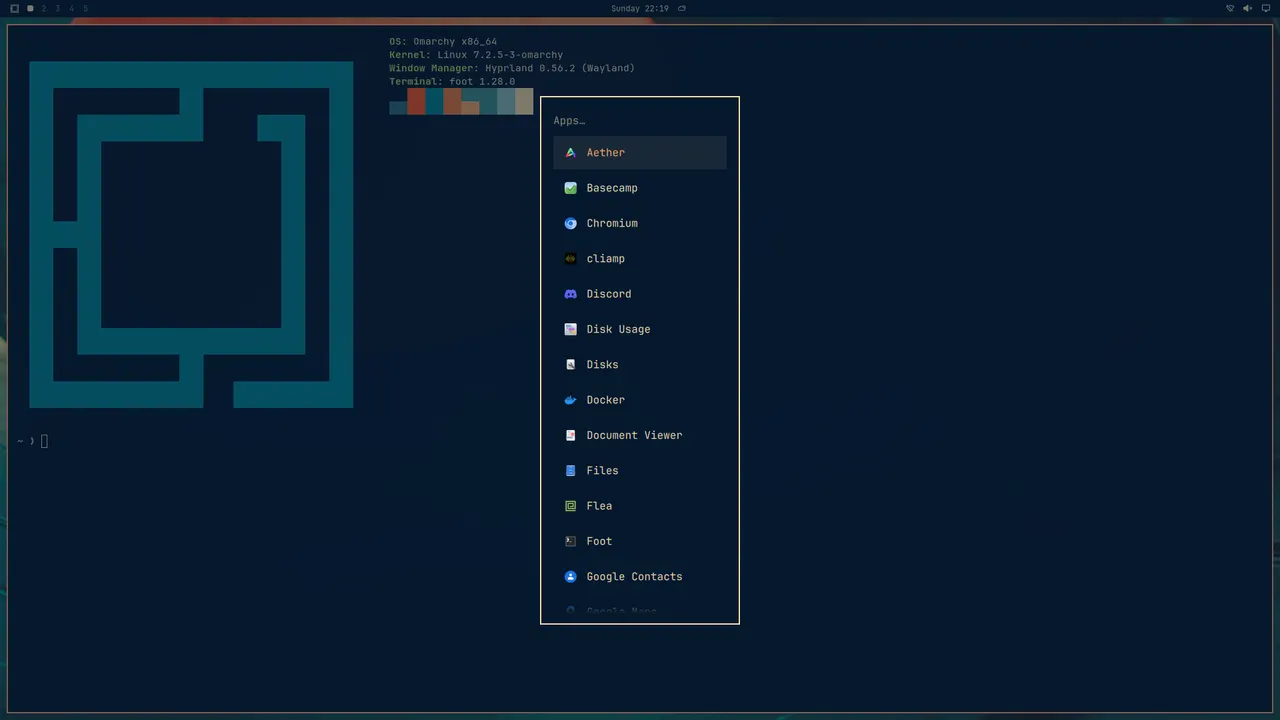
omabox shot.Themes
Your theme, live.
--theme-dir puts the theme you are editing in the box, every save with it; --theme starts a
box on the theme you name, whatever your desktop is on. Both say what a person would notice: a key no fallback
resolves, text too faint to read, a background too small or nearly one colour. look theme applies it and
shoots the desktop and a terminal printing its palette.
$ omabox up --theme-dir ~/code/my-theme --theme my-theme
$ omabox run -- omarchy-theme-set my-theme   # after an edit
$ omabox look theme ~/code/my-theme
Checks
A clean Omarchy, for checks.
up --clean: Omarchy's bar on tokyo-night, a solid magenta wallpaper (any of it inside a window is a
hole), the bar's clock frozen at Friday 12:00, English in UTC, no pointer, no network, no fonts of yours, no
animations, and no name of yours (user@omabox). A baseline is the same image on every machine.
--keep takes back what a test needs.
$ omabox up --clean
$ omabox up --clean --keep fonts,pointer
Visual checks →
Omarchy itself
Omarchy's own checkout and stack.
--omarchy
Your checkout, never installed
up --omarchy DIR runs a box on that tree's config, shell and scripts, as omarchy dev link
would, without touching your system.
$ omabox up dev --omarchy ~/src/omarchy
$ omabox hyprctl reload
--quickshell
Your Quickshell build
up --quickshell PATH runs the box's shell on a Quickshell build of yours.
$ omabox up --quickshell ~/code/quickshell/build/src/quickshellBinds and tests
Omarchy's own binds work
Omarchy's binds are the box's: SUPER + SHIFT + B opens the browser in the box, not on your desktop.
The bar widget
Every box, from your bar.
The omabox mark in your bar lists every box, with peek, screenshot and down for each, keys-to-box and the clipboard
for an interactive one, and an orphan box (one nobody will take down) said on its row. On Omarchy 4.5 a box's windows can open on
special:omabox, a workspace of omabox's own that the widget's Show opens.
The copy here works: click a box, or focus the panel and use its keys. Its gear opens the settings.
$ omabox down --orphans
Peek and interactive boxes →Your desktop. The boxes are elsewhere, invisible, until you peek.
A working copy of the widget's panel in omabox 1.6.1. The boxes are made up; the screenshots are real.
A plain box
Hyprland, nothing of Omarchy's.
Since omabox 1.3, a box runs on any Hyprland. Where Omarchy isn't installed, up starts a plain
box by itself and says so. On Omarchy, --desktop plain gives you one for an app that must not depend on
Omarchy, and config desktop plain makes it every box's default.
What it has
A small config, and your keyboard
Hyprland's defaults, your keyboard layout, SUPER + RETURN a terminal, SUPER +
W closes a window. A HOME with git's name and email only. No bar, launcher, tray, notifications or
wallpaper unless a shell brings them. Options that need Omarchy (--plugin, --theme,
--stock) are refused, saying why.
$ omabox up                       # no Omarchy here
$ omabox up bare --desktop plain  # on Omarchy
$ omabox config desktop plain     # the default
--shell CMD
Your shell as its bar
--shell runs the shell you name in the box: dms run, qs -p DIR,
caelestia shell -d. up waits until it draws, log shell is its output,
restart-shell starts it again, and a crash is said as the shell's.
$ omabox up --shell 'dms run'
$ omabox up --shell 'qs -p ~/my-shell' --ro-bind ~/my-shell
Someone else's rice
Try a shell without installing it
A Quickshell shell someone published runs from its own folder in a plain box, with no network unless you open it.
You look at it with shot or peek; never run its install script. A box is not a security
boundary: the shell's code can still start any process. What a box holds, and what it
doesn't.
$ omabox up --desktop plain --net isolated \
    --shell 'qs -p /path/to/their/shell'
--hyprland DIR
Another Hyprland, whole
A build folder, an install prefix or an unpacked package runs as the box's Hyprland, its own libraries and
hyprctl with it. A box can run Hyprland 0.57 on a desktop that has 0.56.
$ omabox up patched --hyprland ~/code/Hyprland/build
Hyprland work →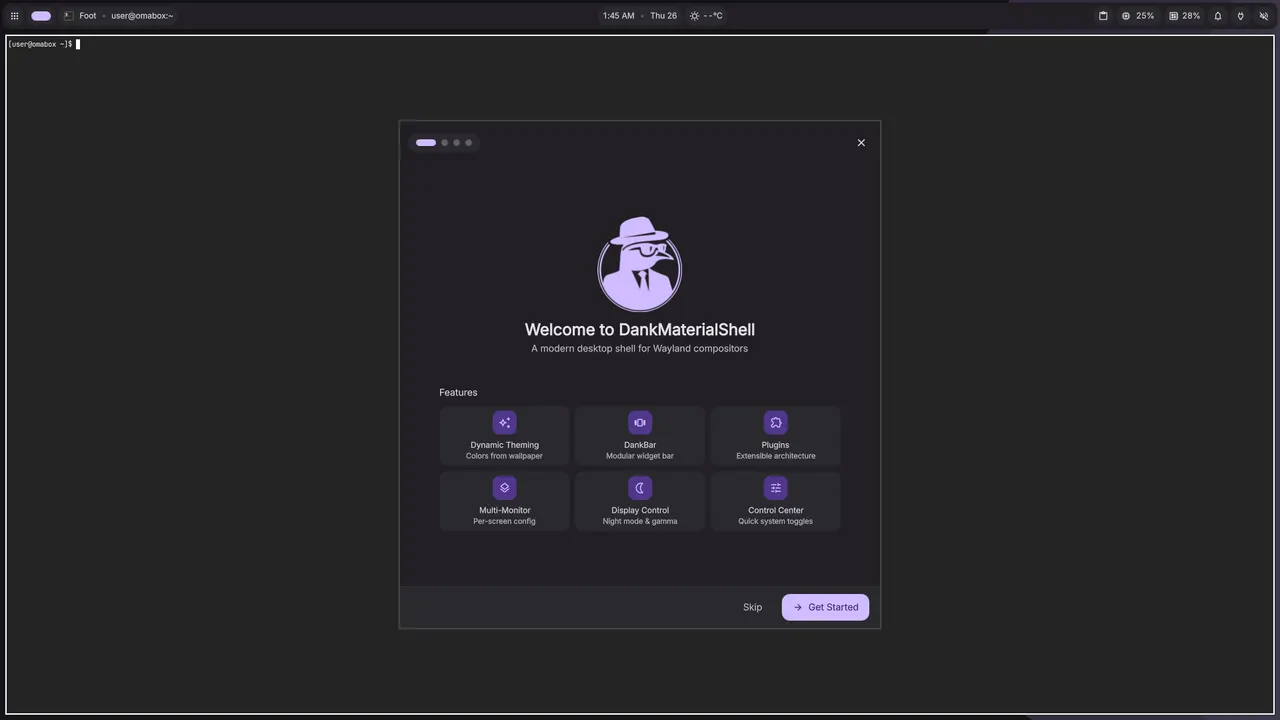
--shell 'dms run'. A box is always a first run, so DankMaterialShell greets you.Where it's tested
- Arch without Omarchy
- Fedora 45
- Debian sid
- openSUSE Tumbleweed
Each in a VM of its own, install.sh through to real boxes. Plain Arch runs the whole test suite, on a
virtual GPU and on a real NVIDIA card. Fedora's Hyprland comes from a COPR; on Debian sid, Hyprland 0.57.0 drops every
GPU app in a box (fixed in 0.57.1, and omabox doctor warns).
Not yet
- NixOS
- Ubuntu 26.04 LTS
- Alpine
- Void
NixOS: a box looks for its programs in /usr/bin. Ubuntu 26.04, Alpine and Void ship no
Hyprland with the Lua config.
Your own desk
Your desktop, in a box.
Since omabox 1.4, --desktop desk copies your Hyprland config, your shell and your look into a
box, at your HOME's own path, so what names your paths finds them. Your agent tries a change to your binds, dotfiles or
shell there first, and you look at it before it reaches your session.
What's copied
A copy, never your files
Your ~/.config/hypr, the config and state of the shell you run, and the wallpapers they show. Links
(stow, home-manager) are followed and copied as files, so nothing the box writes reaches yours. A link into a secret
store, a secret's name, a file with a key's shape and what is over the caps stay out, and up says what
it left out. The HOME is still a box's own: your ~/.ssh is not there.
$ omabox up --desktop deskWhat runs
Your config, through a policy
Your hyprland.lua runs as on your desk, your look, input and binds with it, and omabox's settings over
it (the screen and monitors). What it starts goes through an autostart policy: idle and lock daemons, your systemd
session and system-bus applets are dropped, the rest runs. Each decision is a line of log autostart. A
hyprland.conf alone is refused.
$ omabox log autostartYour shell
One shell, found for you
DMS, Noctalia, Caelestia, Waybar or a Quickshell config, found in what your config starts or by its systemd unit,
runs as the box's shell; up says which. A second one is dropped. On an Omarchy desk the box is an
Omarchy box running your config, with your plugins and shell.json.
Held awake
No lock between two steps
Your shell's idle timeouts would lock or blank the box while an agent thinks. A desk box holds idle off, and turns the timeouts off in its copy where it knows how.
Refused for now: --clean (the path carries your login name), a jailed agent's desk box,
check run --desktop desk (a check needs the same box every run) and --net host.
A shell or distro that doesn't work yet?
Tell us which, and what you'd want an agent to do with it.
Give every agent a desktop of its own.
git clone https://github.com/diogochaves/omabox && cd omabox && ./install.shAny Hyprland 0.56+ · fullest on Omarchy · AMD, Intel or NVIDIA · MIT