Uses
A desktop to spare, for whatever you're making.
Testing is where omabox started. Any job that needs a screen and shouldn't touch yours fits in a box too: a video of what you made, a shot at twice your monitor's pixels, a desktop with nothing of yours in it. These are the ones we use it for, each with the commands that do it and what to watch out for.
Your agent can do every one of them. Ask it for the video, the shots or the check, and it starts the box, drives it and hands you the files.
Pictures and video
Film what you made, while you keep working.
A demo of your app, plugin or feature, filmed in a box. Your desktop stays yours the whole time: no window to keep still, no notification landing mid-take, no cursor to keep out of the way. Your marks become captions, and the clicks and keys omabox sent are drawn in.
What it's for
- A README clip, a release video, a feature for X or a talk.
- A take your agent scripts and films again after each change, the same every time.
- Marks at each scene: captions in the video, and the times to cut at.
$ omabox up --stock-bar --theme tokyo-night
$ omabox record start -o demo.mp4 --glide 600ms
$ omabox record mark "open the panel"
$ omabox keys --wait super+space
$ omabox record hold 2s
$ omabox record mark "scene 2"
$ omabox click --window app 120 40
$ omabox record stop --show-input --captions --cut-idle
--glide moves the pointer there in that time, so the viewer sees it travel.
--show-input draws a ring under the pointer, a ripple on each click and the keys at the bottom;
--captions puts the marks at the top; --cut-idle cuts every still stretch to a second.
stop also writes demo.vtt and demo.marks.tsv beside the video.
Watch out for
- Time with
record hold, notsleep. A script's sleeps run longer than they say, and a slow box shortens the pause the viewer sees.record hold 2sis two seconds of video. - Only omabox's own input is drawn. An app moving its own windows is not input.
- One recording a box at a time.
record statussays if one runs. It needs wf-recorder and ffmpeg; both run in the box. - What the box shows is in the video. A bar copied from your desktop, your theme's wallpaper: start
with
--stock-barand a stock theme, or a clean box.
With its sound, and nobody hears it.
A box started with --audio has its own PipeWire: a speaker nobody hears and a silent
microphone. Your app plays into it, and record --audio puts that sound in the video, in step with the
picture. Your own speakers stay quiet.
What it's for
- A video of a music player, a notification sound, a game.
- Proof a sound played at all:
omabox audiosays when the box made one, and how loud.
$ omabox up --audio
$ omabox record start --audio -o player.mp4
$ omabox click --window player 40 300
$ omabox record hold 5s
$ omabox record stop
$ omabox audio 3s          # did it make a sound, and when
Watch out for
- Without
--audioa box has no sound at all, andrecord --audioneeds a box started with it. - The microphone is silent. An app that records you records nothing.
- Nothing reaches your audio: a box has no
/dev/sndand never your audio server. A sound starts within about 15 ms of the picture; a player is slower to start than a terminal to draw.
Read a take, don't watch it.
A contact sheet is a video as one image: frames from start to end, each labelled with its time and the marks since the frame before. An agent reads it in place of watching the video, finds the scene that went wrong and fixes its script. You get to skim a take in a second.
What it's for
- Checking a take before anyone watches it.
- Any video at all, with
record sheet: one made elsewhere too. - A transition, frame by frame:
shot --bursttakes frames 100 ms apart and sheets them.
$ omabox record stop --sheet                # demo.sheet.png beside the video
$ omabox record sheet demo.mp4 --every 2s -o demo-sheet.png
$ omabox shot --burst 12 --sheet --after -- keys super+space
Watch out for
- A box must be up for
record sheet: ffmpeg reads the video in the box. - 15 frames by default, five a row;
--frames Nor--every 2sfor more,--fit Nfor the sheet's size.
Shots at 2x, or 4K, whatever your monitor is.
A box is the size and scale you ask for. At --size 3840x2160,scale=2 it's laid out as
1920x1080, the bar and apps their usual size in twice the pixels, so a shot is 3840x2160 and a recording is a 4K
video. Crisp pictures for a README, a store page or a talk, from a 1080p monitor or a laptop.
What it's for
- One window's own pixels, covered or on another workspace too:
shot --window. - A video at the box's own pixels: a 4K box gives a 4K video.
- More than 2x: scale goes from 1 to 4.
$ omabox up --size 3840x2160,scale=2
$ omabox run -d --wait -- ./build/app
$ omabox shot --window app -o [email protected]
$ omabox shot --no-pointer -o [email protected]
$ omabox record start -o app-4k.mp4
Watch out for
- Hyprland may round a scale to whole pixels;
modesays so. - Clicks stay in the layout's coordinates (1920x1080 here), not the shot's pixels.
click --in SHOT X Ymaps a shot's. - A screen shot shows the pointer;
--no-pointerleaves it out. Window shots never have it. - Twice the pixels is more GPU.
omabox gpumeasures what the box costs.
Screenshots in any theme, without changing yours.
Your plugin's README wants a shot in each theme people use. Change the theme in the box, wait for it to
settle, take the shot, and go on to the next. Your desktop stays on its own theme the whole time. A theme you're
making goes in live with --theme-dir.
What it's for
- A plugin's bar widget in every theme, for its README or a catalog.
- A theme you're making, shot as you edit it.
- Omarchy's default bar (
--stock-bar), as most people see it, not your own layout.
$ omabox up --plugin ./my-widget --stock-bar --theme tokyo-night
$ for t in tokyo-night catppuccin gruvbox nord; do
    omabox run -- omarchy-theme-set $t
    omabox wait still
    omabox shot -g "0,0 1920x26" -o bar-$t.png
  done
# a theme you're editing, live in the box
$ omabox up --theme-dir ./my-theme --theme my-theme
Watch out for
- Without
--stock-barthe box copies your bar's layout, andupsays so. - A theme's wallpaper comes with it. For a theme you also keep backgrounds of your own for, the box starts on yours first.
- Your fonts are in the box, so a theme draws as on your desk;
--no-seed fontsshows it with only the system's.
A demo video, filmed in a box.
omabox's own clip was filmed this way. A box played the desktop: Omarchy's stock bar, a stock theme, a terminal. Inside it, a second box ran, driven from that terminal the way an agent drives one. Nothing in the video came from a real desktop. Our videos are still made like that: the footage from a box, the titles and motion added after.
$ omabox up --stock-bar --theme tokyo-night --no-pointer
$ omabox record start -o take.mp4 --no-pointer
$ omabox record mark "desktop"
$ omabox wait still --quiet 1500ms --timeout 4s
$ omabox record mark "terminal"
$ omabox keys super+Return
$ omabox keys -t 'echo "made in a box, not on your desktop"' Return
$ omabox record mark "launcher"
$ omabox keys --wait super+space
$ omabox record stop --sheet
A take as our video tool scripts one: a mark at each scene, so the edit knows where to cut.
Watch out for
- A terminal's prompt and title show your user and host names. Keep them out of frame, or shorten the title, before you publish.
- Your git name and email are in a box, so
git login a shot shows them. - Let the screen settle between scenes with
wait still, and hold withrecord hold.
This site's pictures, every one.
Every screenshot on omabox.app was taken by omabox, in a box: the desktop, the terminal, the launcher, the three monitors, Dux Shell on /next. So was the card a link to omabox.app shows on X and Discord: the home page, opened in a box at 1200x630, frames taken while its live view moves, one picked.
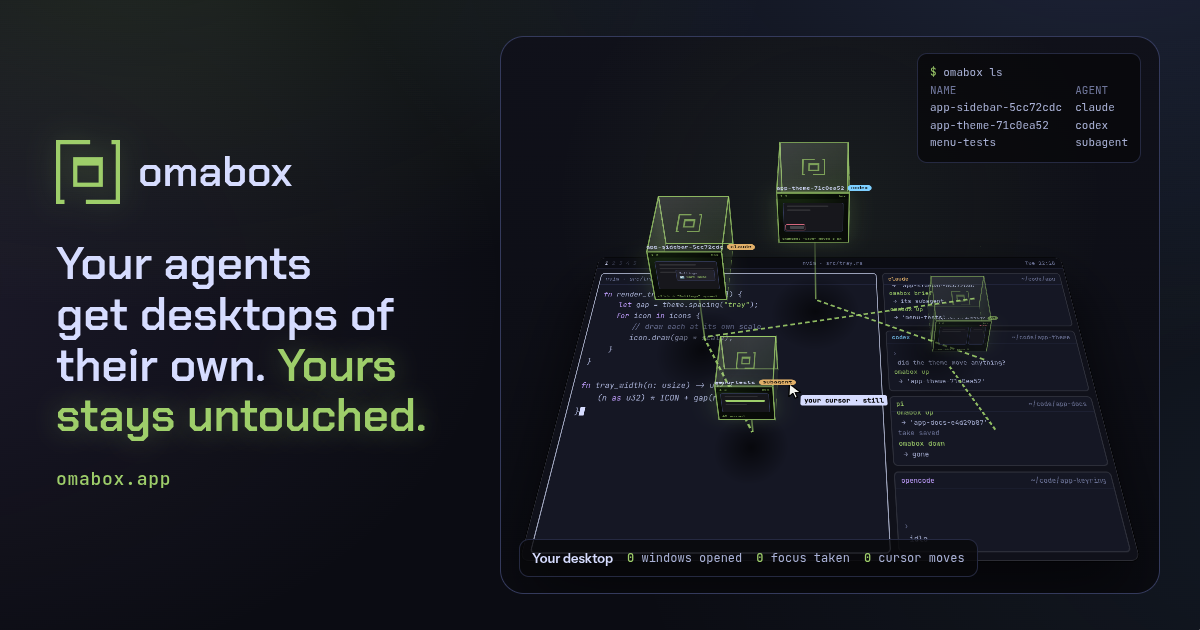
$ omabox up og-card --size 1200x630
$ omabox -b og-card run -d --wait -- chromium --kiosk --no-first-run \
    --user-data-dir=/tmp/ogc --hide-scrollbars "file://$PWD/og/card.html"
$ omabox -b og-card pointer -- move 1199 629   # the pointer out of the picture
$ omabox -b og-card shot --burst 14 --every 700ms --sheet
$ omabox down og-card
Watch out for
- Nothing personal in a public shot: no user or host names, no hardware lines from fastfetch.
- A box the size of the picture beats cropping: the page lays itself out for it.
- A moving page gives a different frame each time. A burst lets you pick the best one.
A desktop that isn't yours
A clean setup, not yours.
A box made for pictures that must match from run to run: Omarchy's stock bar on a stock theme, the bar's clock frozen at "Friday 12:00", English in UTC, no pointer, no network, animations off and none of your fonts. Only what you're showing moves.
What it's for
- Docs and store pages that should look like a fresh install.
- Shots compared across runs:
omabox checkstarts its boxes clean. - A bug report's picture with nothing of yours in it.
$ omabox up --clean --stock-bar --theme tokyo-night
# give back what a picture for people needs
$ omabox up --clean --theme catppuccin --keep wallpaper,animations
Watch out for
- The wallpaper is magenta (#ff00ff, which no theme has), so a hole in a window shows in a check.
--keep wallpapergives the theme's own back (or yours, if you keep backgrounds for that theme), and setting a theme in the box brings that theme's. - No network unless you give it back with
--net connected. - Clean is not anonymous. A terminal's prompt still shows your user and host names, and your git name and email are in the box.
Try a theme or plugin before your desktop gets it.
Someone published a theme or a bar plugin. Install it in a box first, on Omarchy's stock bar, and see
what it does. omabox down deletes the box's HOME with everything it installed there.
What it's for
- Seeing a theme with your apps before you switch to it.
- Checking a plugin from a stranger's repo starts at all, and what it puts in the bar.
$ omabox up --stock-bar --no-seed extensions
$ omabox run -- omarchy theme install https://github.com/someone/their-theme.git
$ omabox run -- omarchy plugin add https://github.com/someone/their-plugin.git --enable --yes
# its widget is in the box's bar a second later, no restart
$ omabox shot
Watch out for
- omabox is not a security boundary. A box shares your kernel, your GPU and, by default, your network,
and what it sends out is real. For code you don't trust, start the box with
--net isolatedat least, use ai-jail, or a VM. - A box sees only what you give it: the repo you start it from, read-only, and nothing of your HOME's secrets.
--no-seed extensionsstarts the box with a new user's plugin settings, not yours.
Monitors you don't have.
Portrait, scaled, side by side or below, as many as the job needs, each with its own bar. Plug and unplug them while the box runs, take one monitor's shot, or film the whole layout as one video.
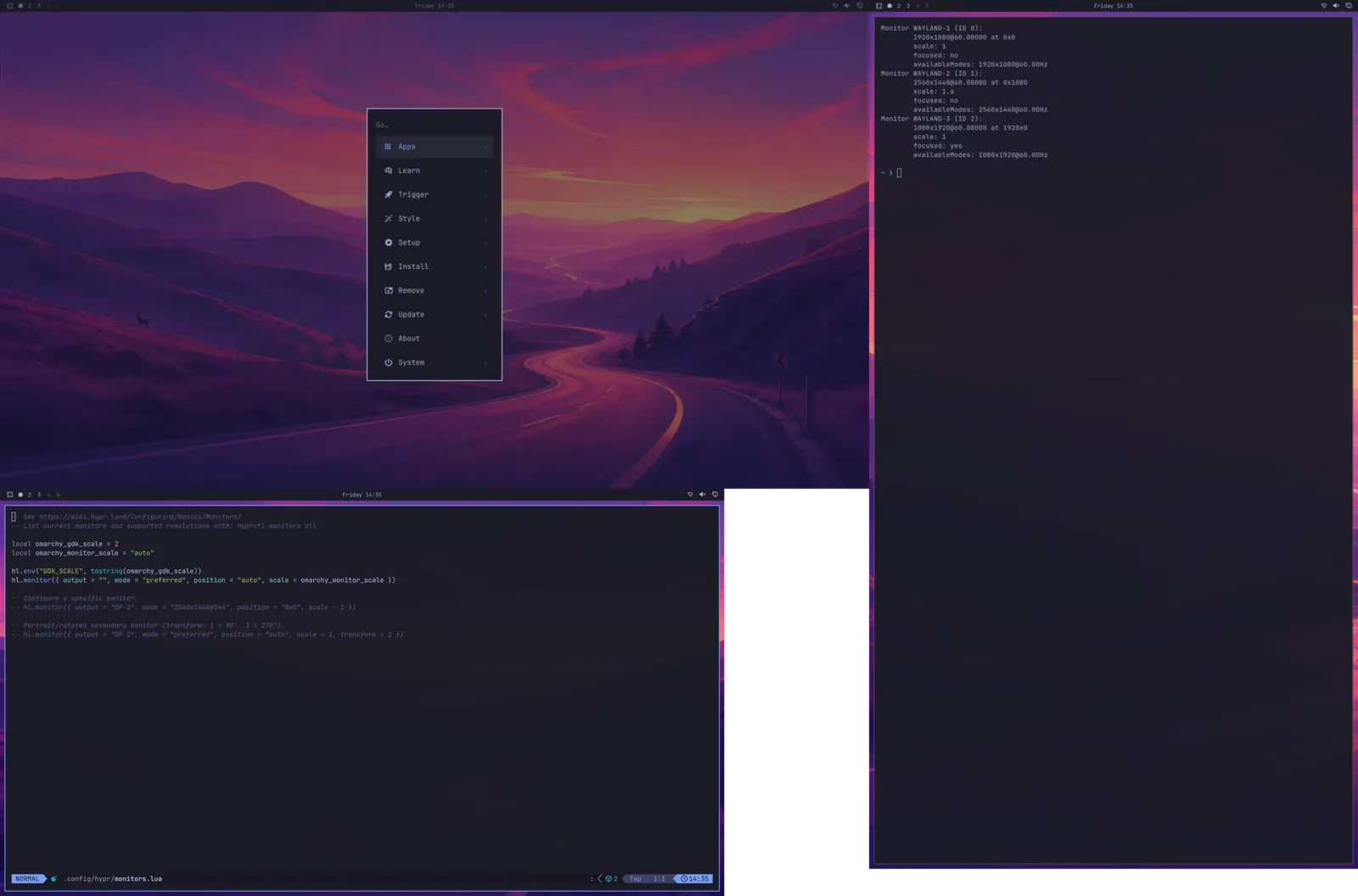
omabox shot.What it's for
- A plugin or app on an ultrawide, a portrait screen or mixed scales you don't own.
- A video of what happens when a monitor is added:
record --monitor allfilms every monitor at its place.
$ omabox up --monitor 2560x1440,scale=1.6,below --monitor 1080x1920,1920,0
$ omabox monitor add 3440x1440,right
$ omabox monitor list
$ omabox shot --monitor HEADLESS-4 -o portrait.png
$ omabox record start --monitor all -o layout.mp4
$ omabox monitor remove HEADLESS-5     # the ultrawide, unplugged
Watch out for
- The monitors are virtual. Real modes, HDR, VRR, a real hotplug and suspend don't run in a box.
- Names: the main screen is HEADLESS-2, the others HEADLESS-3 and on; on NVIDIA they're WAYLAND-1,
-2 and on.
monitor listsays which. - A very big layout is scaled down to fit H.264 (8192x4352's pixels), said when the recording starts.
A web page, off your screen.
Your agent opens a site in the box's browser, pages down, reads the shots and narrows the window to a phone's width. No browser window lands on your desktop. This site is checked that way before every change, and its GPU cost is measured there.
What it's for
- Your own site or web app, looked at by your agent after each change.
- A page at phone width without a phone:
omabox mode 412x915. - What a page costs the GPU, idle and scrolling:
omabox gpu.
$ omabox up                 # from your site's repo: it's in the box, read-only
$ omabox run -d --wait -- chromium --user-data-dir=/tmp/chr --no-first-run \
    --ozone-platform=wayland --app=file://$PWD/dist/index.html
$ omabox shot
$ omabox keys Page_Down
$ omabox mode 412x915
$ omabox gpu 5
Watch out for
- The box's browser starts signed out: your browser profiles never reach a box. Sign in once in a box
and
omabox saveit;up --fromthat save starts signed in. - A box reaches the internet, your LAN and your servers by default.
--net isolated --allow
                PORT
keeps it to your dev server. omabox is not a security boundary. - Across the box boundary use 127.0.0.1, not localhost.
Trouble, found first
Find the crash before your users do.
Unplug a monitor again and again until your shell or plugin falls over, then read the backtrace. A screen going away is what a monitor in standby, a KVM switch or a dock does, and it's where shells crash. Your session never notices.
What it's for
- A shell or plugin that crashes when a screen goes to sleep.
- A compositor change, with your own Hyprland build:
up --hyprland PATH.
$ omabox up --plugin ./my-widget
$ omabox gdb --shell --watch &
$ omabox output drop --cycles 50
$ omabox log gdb --crash
output drop --cycles stops at the first shell crash and names its report.
gdb --watch waits for it and puts the backtrace in omabox log gdb.
Watch out for
- Not in an interactive box: its screens are windows on your desktop, and one dropped couldn't come back.
- No symbols beyond the binaries' own (debuginfod is off).
- gdb traces the box's processes only, never your host's.
More than these? Tell us what you use a box for: omabox's issues.
Give every agent a desktop of its own.
git clone https://github.com/diogochaves/omabox && cd omabox && ./install.shToday on Omarchy 4 · Hyprland 0.56+ · AMD, Intel or NVIDIA · MIT